Creating a stored procedure with one parameter
The following query returns a product list from the products table in the sample database:
| 1234567 | SELECT product_name, list_priceFROM production.productsORDER BY list_price; |
You can create a stored procedure that wraps this query using the CREATE PROCEDURE statement:
| 1234567891011 | CREATE PROCEDURE uspFindProductsASBEGIN SELECT product_name, list_price FROM production.products ORDER BY list_price;END; |
However, this time we can add a parameter to the stored procedure to find the products whose list prices are greater than an input price:
| 12345678910111213 | ALTER PROCEDURE uspFindProducts(@min_list_price AS DECIMAL)ASBEGIN SELECT product_name, list_price FROM production.products WHERE list_price >= @min_list_price ORDER BY list_price;END; |
In this example:
- First, we added a parameter named
@min_list_priceto theuspFindProductsstored procedure. Every parameter must start with the@sign. TheAS DECIMALkeywords specify the data type of the@min_list_priceparameter. The parameter must be surrounded by the opening and closing brackets. - Second, we used
@min_list_priceparameter in theWHEREclause of theSELECTstatement to filter only the products whose list prices are greater than or equal to the@min_list_price.
Executing a stored procedure with one parameter
To execute the uspFindProducts stored procedure, you pass an argument to it as follows:
| 1 | EXEC uspFindProducts 100; |
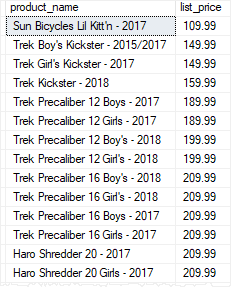
The stored procedure returns all products whose list prices are greater than or equal to 100.
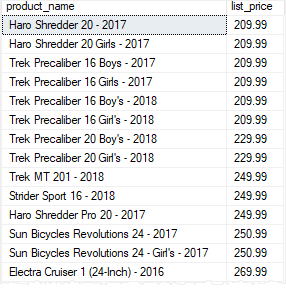
If you change the argument to 200, you will get a different result set:
| 1 | EXEC uspFindProducts 200; |
Creating a stored procedure with multiple parameters
Stored procedures can take one or more parameters. The parameters are separated by commas.
The following statement modifies the uspFindProducts stored procedure by adding one more parameter named @max_list_price to it:
| 1234567891011121314151617 | ALTER PROCEDURE uspFindProducts( @min_list_price AS DECIMAL ,@max_list_price AS DECIMAL)ASBEGIN SELECT product_name, list_price FROM production.products WHERE list_price >= @min_list_price AND list_price <= @max_list_price ORDER BY list_price;END; |
Once the stored procedure is modified successfully, you can execute it by passing two arguments, one for @min_list_price and the other for @max_list_price:
| 1 | EXECUTE uspFindProducts 900, 1000; |
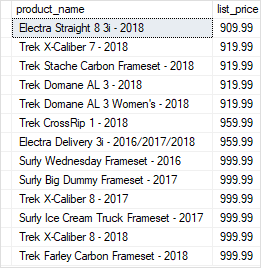
The following shows the output:
Using named parameters
In case stored procedures have multiple parameters, it is better and more clear to execute the stored procedures using named parameters.
For example, the following statement executes the uspFindProducts stored procedure using the named parameters @min_list_priceand @max_list_price:
| 123 | EXECUTE uspFindProducts @min_list_price = 900, @max_list_price = 1000; |
The result of the stored procedure is the same however the statement is more obvious.
Creating text parameters
The following statement adds the @name parameter as a character string parameter to the stored procedure.
| 12345678910111213141516171819 | ALTER PROCEDURE uspFindProducts( @min_list_price AS DECIMAL ,@max_list_price AS DECIMAL ,@name AS VARCHAR(max))ASBEGIN SELECT product_name, list_price FROM production.products WHERE list_price >= @min_list_price AND list_price <= @max_list_price AND product_name LIKE ‘%’ + @name + ‘%’ ORDER BY list_price;END; |
In the WHERE clause of the SELECT statement, we added the following condition:
| 1 | product_name LIKE ‘%’ + @name + ‘%’ |
By doing this, the stored procedure returns the products whose list prices are in the range of min and max list prices and the product names also contain a piece of text that you pass in.
Once the stored procedure is altered successfully, you can execute it as follows:
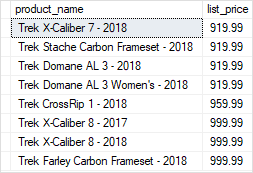
| 1234 | EXECUTE uspFindProducts @min_list_price = 900, @max_list_price = 1000, @name = ‘Trek’; |
In this statement, we used the uspFindProducts stored procedure to find the product whose list prices are in the range of 900 and 1,000 and their names contain the word Trek.
The following picture shows the output:
Creating optional parameters
When you execute the uspFindProducts stored procedure, you must pass all three arguments corresponding to the three parameters.
SQL Server allows you to specify default values for parameters so that when you call stored procedures, you can skip the parameters with default values.
See the following stored procedure:
| 12345678910111213141516171819 | ALTER PROCEDURE uspFindProducts( @min_list_price AS DECIMAL = 0 ,@max_list_price AS DECIMAL = 999999 ,@name AS VARCHAR(max))ASBEGIN SELECT product_name, list_price FROM production.products WHERE list_price >= @min_list_price AND list_price <= @max_list_price AND product_name LIKE ‘%’ + @name + ‘%’ ORDER BY list_price;END; |
In this stored procedure, we assigned 0 as the default value for the @min_list_price parameter and 999,999 as the default value for the @max_list_price parameter.
Once the stored procedure is compiled, you can execute it without passing the arguments to @min_list_price and @max_list_price parameters:
| 12 | EXECUTE uspFindProducts @name = ‘Trek’; |
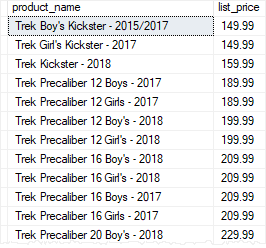
In this case, the stored procedure used 0 for @min_list_price parameter and 999,999 for the @max_list_price parameter when it executed the query.
The @min_list_price and @max_list_price parameters are called optional parameters.
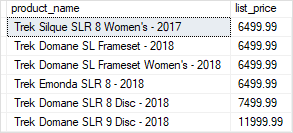
Of course, you can also pass the arguments to the optional parameters. For example, the following statement returns all products whose list prices are greater or equal to 6,000 and the names contain the word Trek:
| 123 | EXECUTE uspFindProducts @min_list_price = 6000, @name = ‘Trek’; |
Using NULL as the default value
In the uspFindProducts stored procedure, we used 999,999 as the default maximum list price. This is not robust because in the future you may have products with the list prices that are greater than that.
A typical technique to avoid this is to use NULL as the default value for the parameters:
| 12345678910111213141516171819 | ALTER PROCEDURE uspFindProducts( @min_list_price AS DECIMAL = 0 ,@max_list_price AS DECIMAL = NULL ,@name AS VARCHAR(max))ASBEGIN SELECT product_name, list_price FROM production.products WHERE list_price >= @min_list_price AND (@max_list_price IS NULL OR list_price <= @max_list_price) AND product_name LIKE ‘%’ + @name + ‘%’ ORDER BY list_price;END; |
In the WHERE clause, we changed the condition to handle NULL value for the @max_list_price parameter:
| 1 | (@max_list_price IS NULL OR list_price <= @max_list_price) |
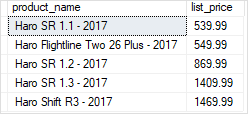
The following statement executes the uspFindProducts stored procedure to find the product whose list prices are greater or equal to 500 and names contain the word Haro.
| 123 | EXECUTE uspFindProducts @min_list_price = 500, @name = ‘Haro’; |